

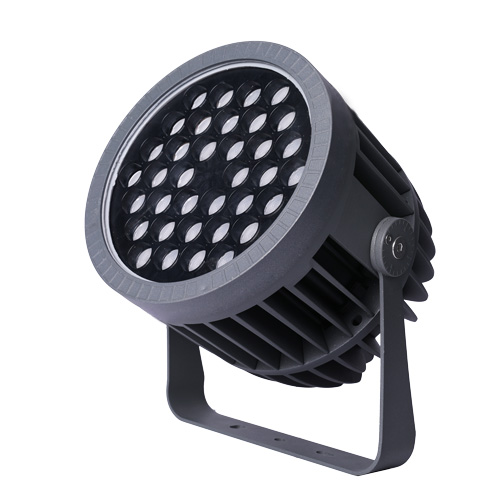
Quick answer: Flood light accessories should be reviewed as part of the fixture selection record. A buyer can make the accessory discussion clearer by separating glare-control, mounting-support, aiming-support and connection-management needs, then tying each part to the project zone, fixture family and file reference.
This guide uses the verified accessory catalogue as the source boundary. It keeps public wording focused on selection and site-review inputs, while exact product details remain tied to confirmed files and buyer records.
What source-backed facts can this accessory guide use?
The accessory catalogue supports specific accessory-family names and general review paths. The public page uses those names as planning categories, not as universal specifications.
| Source | Verified accessory fact | Safe public use |
|---|---|---|
| Accessory catalogue | D22 Lens Anti-Glare Cap is listed as a flood light accessory. | Use it as a glare-control accessory path, not as a universal fixture feature. |
| Accessory catalogue | Radar Anti-Glare Ring and Louver Anti-Glare Ring are listed. | Use them as viewing-comfort parts for site review. |
| Accessory catalogue | Pole and Tree Mounting Brackets are listed with mounting paths. | Use them as mounting-support options that need project photos or drawings. |
| Accessory catalogue | Flood Light Pole Hoop Clamp is listed with pole-size references. | Use it as a pole-mounting review item tied to the exact site note. |
| Accessory catalogue | Rotatable Mount Base Kit is listed in small and large size paths. | Use it as an aiming and base-support review item. |
| Accessory catalogue | Deep Anti-Glare Lens Pressure Plate is listed. | Use it as a deeper glare-control review item. |
| Accessory catalogue | A power-box accessory family is listed. | Describe it as a connection-management accessory without publishing a fixed grade. |
How should buyers map accessory decisions?
Start from the site problem, not from a part list. A clear map helps the buyer, installer and factory reviewer discuss the same requirement.
| Decision trigger | What to check | Accessory review path |
|---|---|---|
| Glare concern | Nearby viewer, facade edge, path, balcony or low mounting height. | Review anti-glare cap, ring, louver or deeper pressure-plate path. |
| Pole or tree mounting | Round pole, tree position, bracket contact area or hoop-clamp path. | Record mounting surface, diameter note and fixture family before comparison. |
| Aiming adjustment | Fixture needs angle review after mounting. | Review rotatable base or bracket path with the site drawing. |
| Connection-management need | Driver or connection box may be discussed with the accessory group. | Keep it as an accessory review item tied to exact project files. |
| Sample review | Accessory appearance or assembly needs buyer comment. | Record sample photo, fixture family and zone name together. |
Which glare-control accessories should be reviewed?
Glare-control accessories are useful when the viewing side and target direction are clear. Record the viewing point first, then compare the relevant part path.
| Glare-control path | Review context | Neutral reference |
|---|---|---|
| D22 lens anti-glare cap | Useful when the buyer wants a cleaner viewing edge around a compact flood or spotlight path. | D22 lens anti-glare cap |
| Radar anti-glare ring | Useful when the light source needs a surrounding glare-control part for review. | radar and louver anti-glare ring |
| Louver anti-glare ring | Useful when side viewing comfort is part of the site discussion. | radar and louver anti-glare ring |
| Deep anti-glare lens pressure plate | Useful when the buyer wants a deeper shielding structure to review with the fixture. | deep anti-glare lens pressure plate |
Which mounting accessories should be checked?
Mounting accessories depend on the surface, direction and fixture family. The safest record connects the mounting part to a marked photo or drawing.
| Mounting path | Review context | Neutral reference |
|---|---|---|
| Pole and tree mounting brackets | Use when a fixture may be supported on a pole, tree or vertical structure. | pole and tree mounting brackets |
| Pole hoop clamp | Use when a pole-mounting clamp path is part of the project note. | pole hoop clamp |
| Rotatable mount base kit | Use when the fixture needs base support and aiming review. | rotatable mount base kit |
| Ground insert tube or base relation | Use when the mounting path should be checked with the landscape plan. | Record the fixture family and marked drawing first. |
What should buyers record for connection-management accessories?
Connection-management accessories should stay tied to the exact project file. The public guide should not turn one accessory title into a broad technical promise.
| Connection topic | Safe use | Record method |
|---|---|---|
| Connection-management box | Use when a driver or connection accessory is part of the project discussion. | connection-management box |
| Power-supply fit note | Use only as a project-file comparison point. | Keep the exact device and size path tied to the confirmed file. |
| Cable and box location | Use when the installer needs the box position reviewed with the fixture zone. | Record location in a drawing or photo note. |
| Accessory group review | Use when the fixture and support items should be compared together. | Avoid turning the accessory note into a broad public claim. |
Which site conditions change accessory review?
Accessories are practical parts, so the site condition matters. A short site table is often clearer than a long unsorted request.
| Site condition | What to observe | Why it matters |
|---|---|---|
| Viewing point | Where people see the fixture or illuminated surface. | Glare-control parts may matter more near eye-level paths. |
| Mounting surface | Pole, tree, wall, ground base, bracket point or landscape structure. | Bracket and clamp choices depend on the actual site note. |
| Fixture family | Compact spot, flood light, garden spike, wall washer or other outdoor family. | Accessories should be tied to the fixture path, not selected alone. |
| Aiming direction | Surface, tree, sign, facade layer, path or public area. | Base and bracket review can change the practical setup. |
| Drawing or photo | Marked site image, catalog page, sample photo or buyer sketch. | Gives the accessory note a clear review basis. |
How can buyers make an accessory input record?
A reusable input record keeps accessory notes aligned with fixture selection, sample comments and project discussion.
| Input field | What to write | Why it matters |
|---|---|---|
| Project zone | Entrance, facade, garden tree, path, plaza, bridge, sign or landscape object. | Keeps the accessory discussion tied to a real area. |
| Accessory role | Glare control, mounting support, aiming support or connection management. | Shows why the part is being reviewed. |
| Fixture relation | Related fixture family, model path or category path. | Avoids free-floating accessory requests. |
| Site note | Mounting surface, viewing point, target direction and drawing reference. | Lets the factory review practical fit. |
| Sample comment | Appearance, proportion, assembly relation or buyer feedback. | Helps the same comment move into the next review. |
Who should review the accessory record?
Different project roles look at accessories from different angles. A shared record reduces repeated explanation and keeps the technical conversation clear.
| Reviewer | What they need | Useful record |
|---|---|---|
| Buyer | Needs a clear accessory role before comparing options. | Zone, fixture family, accessory role and photo note. |
| Designer | Needs viewing comfort and daytime appearance to be clear. | Viewing point, glare concern and finish direction. |
| Installer | Needs mounting surface and aiming path to be practical. | Bracket, clamp, base or box-location note. |
| Factory reviewer | Needs enough context to avoid guessing between similar parts. | Fixture relation, site note and file reference. |
| Purchasing team | Needs comparable accessory records across project zones. | Same field set for every zone. |
How can flood light accessory wording stay fact-safe?
Fact-safe accessory copy uses verified accessory names and buyer-confirmed inputs. It avoids turning old titles, route slugs or unconfirmed files into public claims.
| Topic | Safe wording direction | Avoid |
|---|---|---|
| Protection grade | Ask the buyer to confirm the exact product file and site condition. | Do not publish a fixed public grade from a slug or old title. |
| Control method | Keep it as a buyer-confirmed input if it affects the fixture family. | Do not name one protocol as default. |
| Color plan | Record the desired visual result or color-temperature input. | Do not write default color-output abbreviations. |
| Document needs | Treat documents as project-file questions. | Do not imply universal third-party status. |
| Sales terms | Keep technical accessory pages focused on review inputs. | Do not add unsupported service promises. |
| Component choices | Tie component wording to exact product files. | Do not publish brand or service-life claims without direct support. |
Where should buyers go next?
After the accessory role is clear, the buyer can move to the relevant product page, beam planning guide or sample review record.
| Related path | When to use it | Reference page |
|---|---|---|
| D22 lens anti-glare cap | Glare-control review for compact fixture paths. | D22 lens anti-glare cap |
| Radar and louver anti-glare ring | Viewing-comfort review around the light source. | radar and louver anti-glare ring |
| Pole and tree mounting brackets | Pole, tree or vertical mounting support review. | pole and tree mounting brackets |
| Pole hoop clamp | Clamp path for pole-mounted fixture discussion. | pole hoop clamp |
| Rotatable mount base kit | Base and aiming support review. | rotatable mount base kit |
| Connection-management box | Connection accessory review tied to exact project files. | connection-management box |
| Deep anti-glare lens pressure plate | Deeper glare-control structure review. | deep anti-glare lens pressure plate |
| Beam angle guide | Use when the accessory decision depends on target distance or visual spread. | beam angle guide |
| Sample approval guide | Use when accessory appearance or assembly needs sample comments. | sample approval guide |
Buyer questions about flood light accessories
Why do flood light accessories matter?
Accessories can affect glare control, mounting support, aiming review, connection management and sample comments, so they should be reviewed with the fixture family instead of after the comparison is already scattered.
Which accessory should be checked first?
Start with the project problem: glare concern, pole or tree mounting, aiming support, connection management or sample appearance. The first accessory path should answer that site problem.
When should glare-control parts be reviewed?
Review glare-control parts when the viewer is close to the fixture, when the light source is visible from the side or when the project has a clear comfort requirement from a marked viewing point.
How do mounting accessories affect the project?
Mounting accessories affect where the fixture sits, how it can be aimed and how the site note should be recorded for factory review.
What should buyers record for connection-management parts?
Record the fixture family, project zone, box location, related drawing and exact file reference, then keep the final accessory choice tied to the project file.
Should accessories be compared with the fixture family?
Yes. A bracket, clamp, base or glare-control part only makes sense when the related fixture family, mounting surface and target direction are visible.
How can accessory notes support sample review?
Use the same zone name, fixture relation, accessory role and buyer comment in the sample record, so the accessory decision is not separated from the lighting effect review.
How can accessory wording stay fact-safe?
Keep exact grades, document status, sales terms, component choices and service-life wording tied to confirmed files rather than broad public statements.
Recommended accessory review path
Use the same accessory assumptions from first inquiry through sample review, so the part choice stays connected to the fixture family and project zone.
| Step | Purpose | Link |
|---|---|---|
| 1 | Name the project zone and fixture family. | product range |
| 2 | Record the viewing point and glare concern. | beam angle guide |
| 3 | Record mounting surface and aiming path. | pole and tree mounting brackets |
| 4 | Add connection-management or base notes when they affect the site. | rotatable mount base kit |
| 5 | Carry the same assumptions into sample review. | sample approval guide |
