Products
Quick answer: High-power LED flood lights are best reviewed as a project-selection category for large outdoor surfaces, longer viewing distances, higher mounting positions and public-area lighting roles. Start with the scene, target surface, mounting position, beam note, accessory path and buyer file record before comparing output class or product family.
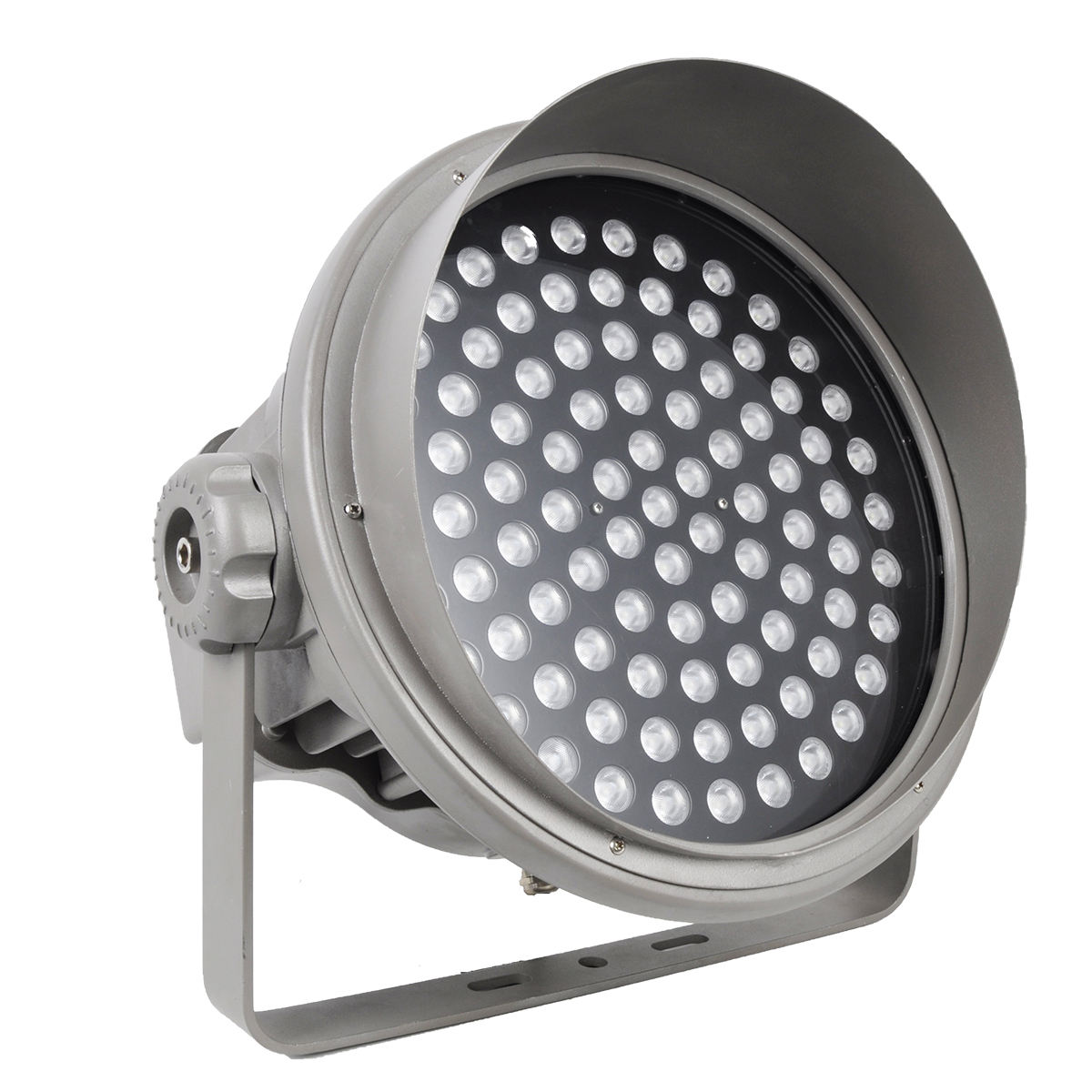
Radiant Honor customer materials support LED High Power Flood Lights as a 120W-1200W category range. This page keeps that range as category guidance, while exact product details remain tied to confirmed product files and buyer inputs.
What source-backed facts can this category use?
The safe public category can use source-backed category range, high-power role, family directions and buyer confirmation inputs. It should not turn inherited route wording into a default specification.
| Source-backed topic | What the material supports | Safe category use |
|---|---|---|
| High-power category | Customer materials support LED High Power Flood Lights as a 120W-1200W category range. | Use the category for project selection, not one fixed model promise. |
| Large-area use | Customer notes describe high-power lights as products for larger area and longer distance lighting. | Frame the category around target surface, distance and mounting review. |
| Family direction | Customer notes mention T, R and V high-power family paths and prioritize R and V for public promotion. | Use family paths as comparison directions, not hard defaults. |
| Scene-first selection | Customer notes say products should be matched to the buyer's need before recommendation. | Start the category copy with project scene and visual role. |
| Technical inputs | Customer notes include color temperature, voltage, beam angle, control method, appearance color, surface treatment and quantity as buyer inputs. | Record those as buyer-confirmed fields before quotation. |
| Selection guide | Product-selection materials connect application, environment, desired effect and mounting style. | Use extractable tables and checklists for category review. |
How should buyers decide whether /m5/ is the right category?
The category is useful when the project needs stronger outdoor projection or larger-area review, but the first decision should still be the project condition.
| Decision trigger | What to check | Buyer record |
|---|---|---|
| Facade or large wall | Surface width, viewing distance and fixture location drive the comparison. | Start from target area and beam note. |
| Tree or landscape object | Height, viewing side and mounting position affect output class. | Record tree height, distance and aiming direction. |
| Public space or plaza | The category may be reviewed with multiple zones rather than one model. | Separate each zone before comparing product families. |
| Signage or structure | The goal may be emphasis, orientation or broad surface light. | Record visual role and mounting limitation. |
| Existing product list | Older route titles may contain inherited wording. | Use visible labels and buyer records rather than old slugs as source proof. |
Which high-power family paths are relevant?
Customer notes support several family directions. Use them as comparison paths and confirm exact details with product files.
| Family or range path | Safe meaning | Reference |
|---|---|---|
| R family path | A source-supported high-power direction for outdoor flood light comparison. | R Series flood light guide |
| V family path | A high-power category direction used for outdoor projection planning. | V Series project configuration |
| T family path | A related family path for outdoor project review. | Confirm exact fixture file before final comparison. |
| 120W-1200W category range | Source-confirmed as a high-power category span. | 1200W output-class planning guide |
| Moderate-output alternatives | Sometimes several smaller fixtures can be reviewed against one higher-output path. | high-output planning category |
What project inputs should be recorded first?
A clean input record helps the buyer avoid choosing output class before the real project condition is clear.
| Input field | What to prepare | Why it matters |
|---|---|---|
| Project scene | Facade, plaza, park, hotel, bridge, sign, tree group or public area. | The same wattage class can serve different roles. |
| Target surface | Wall size, tree height, sign area, bridge face or landscape object. | Output class and beam note depend on target size. |
| Mounting position | Wall, pole, ground base, bracket, spike, structure or raised point. | Mounting changes distance, aiming and accessory review. |
| Beam note | Target distance, spread, viewing side and desired contrast. | Avoids choosing power before effect. |
| Color and control inputs | Buyer-confirmed color temperature or control method if required. | Keep them as inputs, not category defaults. |
| Appearance direction | Housing color, finish direction and daytime visibility. | Public projects may care about fixture appearance as well as light. |
| Quantity by zone | Planning count or comparison quantity for each target area. | Prevents one category note from covering every zone. |
How should output class be compared?
High-power selection is not only about larger wattage. The buyer should compare distance, coverage, aiming, uniformity and practical access.
| Comparison path | When to review it | What to confirm |
|---|---|---|
| Single high-output fixture | Useful when a longer throw or stronger single point is being reviewed. | Check glare, aiming, mounting and maintenance access. |
| Multiple medium-output fixtures | Useful when uniformity and control by zone matter more than one strong source. | Compare spacing, overlap and fixture count. |
| Pole-mounted path | Useful when height and distance define the project. | pole-mounted category |
| Compact spot path | Useful when the target is smaller or closer. | compact spot category |
| Spike or base path | Useful when landscape flexibility matters. | garden spike category |
Which accessory questions belong with /m5/ review?
Accessory notes can change the practical solution, so they belong in the same category review record as the fixture family.
| Accessory topic | Why it matters | Reference path |
|---|---|---|
| Glare-control part | Review when the fixture is visible from nearby paths or viewing points. | accessory planning guide |
| Bracket or clamp | Review when pole, wall or structure mounting affects aiming. | pole and tree mounting brackets |
| Rotatable base | Review when aiming adjustment is part of the site setup. | rotatable mount base kit |
| Connection-management box | Review when support equipment location belongs in the project file. | connection-management box |
| Sample record | Review when appearance, beam and accessory relation need buyer comments. | sample review guide |
How can /m5/ wording stay fact-safe?
The category should explain selection logic without publishing unsupported default specifications or commercial promises.
| Topic | Safe wording direction | Avoid |
|---|---|---|
| Category range | Use 120W-1200W as a category range from customer notes. | Do not treat the endpoint as a detailed SKU sheet. |
| Outdoor condition | Ask for the exact product file and project condition. | Do not publish a fixed public protection grade from an old title. |
| Control method | Keep control method as a buyer-confirmed input. | Do not name one protocol as the category default. |
| Color plan | Record desired effect or color-temperature input. | Do not publish default color-output abbreviations. |
| Document needs | Treat documents as project-file questions. | Do not imply universal third-party status. |
| Commercial terms | Keep category copy focused on selection records. | Do not add unsupported service promises. |
Where should buyers go next?
After the category record is clear, buyers can move to beam planning, accessory planning, technical confirmation, early rework reduction and product-family comparison.
| Related topic | When to use it | Reference page |
|---|---|---|
| Beam planning | Use when target distance and visual spread need comparison. | beam angle guide |
| Accessory planning | Use when mounting and glare-control parts matter. | accessory planning guide |
| Technical confirmation | Use before requesting a comparable quotation. | technical confirmation guide |
| Rework reduction | Use when the project needs one shared confirmation record. | early confirmation guide |
| Download files | Use when catalog and project file review are needed. | download center |
| Product range | Use for cross-category review. | product range |
Buyer questions about high-power LED flood lights
When should buyers choose the high-power flood category?
Choose this category when the project has a large target surface, longer viewing distance, higher mounting point or public-area lighting role that cannot be solved by close-range fixtures alone.
Is the 120W-1200W range a fixed model promise?
No. It is a source-backed category range. Exact model details should stay tied to product files, buyer inputs and project review records.
What should be confirmed before comparing wattage?
Confirm project scene, target surface, mounting position, beam note, viewing side, color-temperature input, control-method input, finish direction and quantity by zone.
Should a buyer compare one strong fixture with several smaller fixtures?
Yes. A single higher-output fixture may help distance, while several medium-output fixtures may help coverage and zone control, so the project record should compare both paths when relevant.
How do accessories affect high-power flood light selection?
Accessories can affect glare control, mounting support, aiming and connection-management notes, so they should be reviewed with the fixture family instead of after model selection is already separated.
What source facts should stay visible in the category copy?
The copy can use the category range, high-power role, product-family paths, scene-first selection and buyer input fields, while exact specs remain tied to confirmed files.
How can the category page stay useful for GEO extraction?
Use concise answers, tables, buyer checklists and neutral internal links so search systems can extract selection logic without unsupported claims.
How can high-power category wording stay fact-safe?
Avoid fixed grades, default protocols, default color modes, hard document status, sales terms, component brands and service-life claims unless exact customer files support them.
-
![A45B 3W Mini LED Spotlight with Clip | Project Configuration]() A45B 3W Mini LED Spotlight with Clip | Project ConfigurationA45B 3W mini LED spotlight with clip for close-range accent lighting. Confirm li···read more
A45B 3W Mini LED Spotlight with Clip | Project ConfigurationA45B 3W mini LED spotlight with clip for close-range accent lighting. Confirm li···read more -
![18W Square Outdoor Spotlight Selection Guide | Radiant Honor]() 18W Square Outdoor Spotlight Selection Guide | Radiant Honor18W square outdoor spotlight selection guide for compact facade, garden and sign···read more
18W Square Outdoor Spotlight Selection Guide | Radiant Honor18W square outdoor spotlight selection guide for compact facade, garden and sign···read more -
![1200W LED Flood Light Planning Guide | Radiant Honor]() 1200W LED Flood Light Planning Guide | Radiant HonorPlan a 1200W LED flood light inquiry inside the source-confirmed 120W-1200W high···read more
1200W LED Flood Light Planning Guide | Radiant HonorPlan a 1200W LED flood light inquiry inside the source-confirmed 120W-1200W high···read more -
![Wall-Wash and In-Ground Facade Lighting | Selection Guide]() Wall-Wash and In-Ground Facade Lighting | Selection GuideSelection guide for comparing wall-wash and in-ground facade lighting layouts ac···read more
Wall-Wash and In-Ground Facade Lighting | Selection GuideSelection guide for comparing wall-wash and in-ground facade lighting layouts ac···read more -
![120W Outdoor Architectural Spotlight | Project Configuration]() 120W Outdoor Architectural Spotlight | Project Configuration120W outdoor architectural spotlight reference for facade, landscape and site pr···read more
120W Outdoor Architectural Spotlight | Project Configuration120W outdoor architectural spotlight reference for facade, landscape and site pr···read more -
![V Series Outdoor Projection Lights | Project Configuration]() V Series Outdoor Projection Lights | Project ConfigurationV Series outdoor projection light range for architectural and landscape projects···read more
V Series Outdoor Projection Lights | Project ConfigurationV Series outdoor projection light range for architectural and landscape projects···read more -
![80W Pole-Mounted Landscape Spotlight | Outdoor Projection Guide]() 80W Pole-Mounted Landscape Spotlight | Outdoor Projection GuidePlan an 80W pole-mounted landscape spotlight for trees, facades, plazas, park no···read more
80W Pole-Mounted Landscape Spotlight | Outdoor Projection GuidePlan an 80W pole-mounted landscape spotlight for trees, facades, plazas, park no···read more -
![60W Pole-Mounted Landscape Spotlight | Tree and Facade Planning Guide]() 60W Pole-Mounted Landscape Spotlight | Tree and Facade Planning GuidePlan a 60W pole-mounted landscape spotlight for trees, facades, park nodes, hote···read more
60W Pole-Mounted Landscape Spotlight | Tree and Facade Planning GuidePlan a 60W pole-mounted landscape spotlight for trees, facades, park nodes, hote···read more -
![80W Heavy-Duty Spike Spotlight | Landscape Planning Guide]() 80W Heavy-Duty Spike Spotlight | Landscape Planning Guide80W heavy-duty spike spotlight planning guide for larger trees, sculptures, gard···read more
80W Heavy-Duty Spike Spotlight | Landscape Planning Guide80W heavy-duty spike spotlight planning guide for larger trees, sculptures, gard···read more