
Products Description
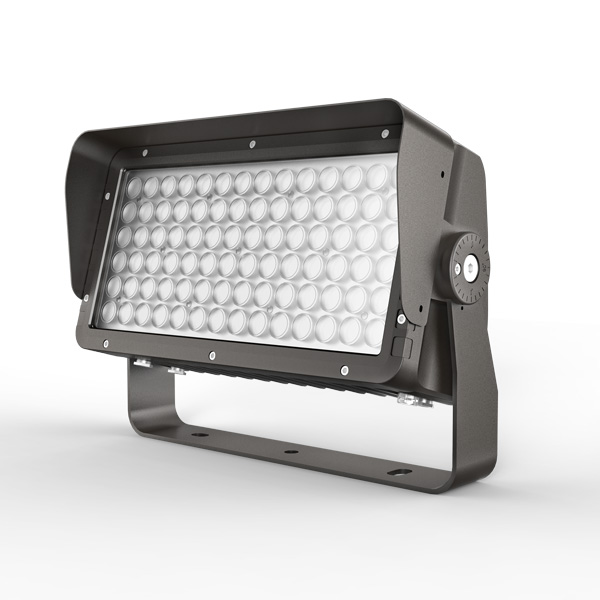
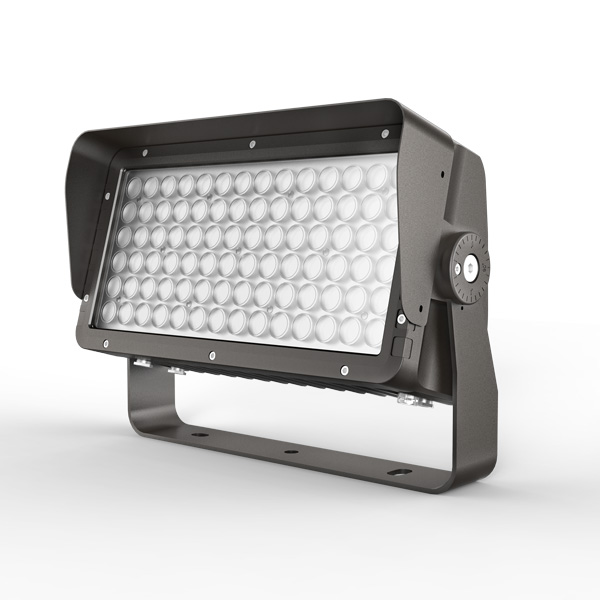
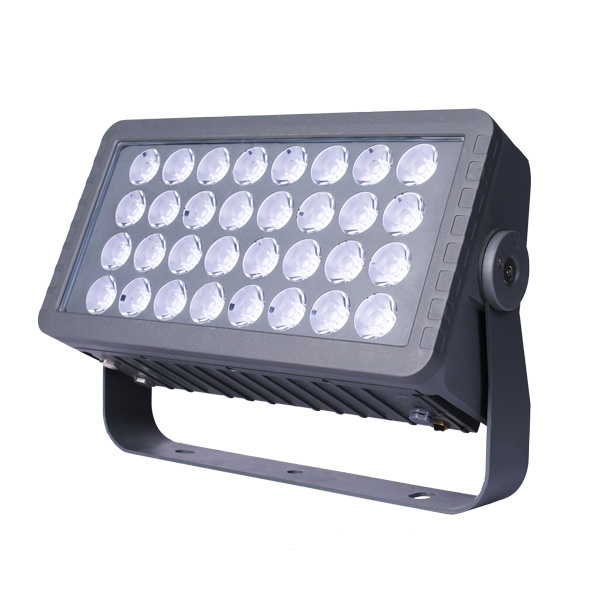
Quick answer: A 120W high-power LED flood light page is best used as a project selection guide, not as a fixed universal datasheet. Use it to confirm scene, mounting relation, target distance, beam angle, color-temperature need, voltage, control method, appearance direction, surface treatment and quantity before exact model comparison.
Radiant Honor customer materials support high-power flood lights as a 120W-1200W category range and describe this family as suitable for large-area and longer-distance outdoor lighting. Exact project details should stay tied to the selected model file and buyer-confirmed record.
What source-backed facts can this 120W page use?
The page can use category-range and planning facts from customer materials, while avoiding unsupported default specs or commercial promises.
| Source-backed topic | What the material supports | How this page uses it |
|---|---|---|
| 120W range position | Customer materials list high-power flood lights as a 120W-1200W category. | Use 120W as an entry point in the high-power flood-light range. |
| Lighting role | Customer notes describe high-power flood lights for large-area and longer-distance outdoor lighting. | Use the page for facade, public-space and project-zone planning. |
| Family directions | Customer notes name T, R and V as relevant high-power paths. | Describe family direction only after the buyer record is clear. |
| Model evidence | R-series selection material includes 120W-class rows. | Mention 120W-class planning without turning every exact value into a universal public spec. |
| Scene-first matching | Customer notes say product matching should begin from buyer needs. | Ask for scene, mounting and visual target before model comparison. |
| Buyer inputs | Customer notes list color temperature, voltage, beam angle, control method, appearance color, surface treatment and quantity. | Keep these as buyer-confirmed inputs for the project file. |
Where does a 120W high-power flood light fit?
Use the 120W page when the project role points toward high-power flood-light planning rather than a small accent, recessed or line-effect path.
| Scene or role | Why 120W may be reviewed | Buyer record needed |
|---|---|---|
| Facade or wall surface | Medium to large surfaces where a concentrated flood-light path is under review. | Record surface size, viewing side and target distance. |
| Bridge or public structure | Outdoor structures where longer-distance aiming may be needed. | Separate structural zone notes from decorative accent notes. |
| Plaza or park node | Open public-space areas where the lighting role needs early definition. | Confirm whether the goal is orientation, accent or broad surface emphasis. |
| Hotel or commercial exterior | Entrance, sign, wall and landscape zones that may need related fixture families. | Use one record per area rather than one mixed model list. |
| Signage or feature accent | Focused high-output review where aiming and beam choice matter. | Record viewing direction and glare-control questions early. |
| Mixed outdoor plan | Projects combining flood, compact spot, in-ground, spike or linear families. | Use the 120W page as one family path inside a wider project map. |
Which family directions are relevant to 120W planning?
Family names help structure selection, but the exact model must remain tied to buyer-confirmed files and current product references.
| Family or reference | Planning role | How to use it |
|---|---|---|
| T family direction | Can appear in high-power planning notes around lower-to-mid output ranges. | Use as a family path only after buyer context is confirmed. |
| R family direction | Source materials include R-series planning rows and 120W-class evidence. | Useful when a project needs a coordinated flood-light family review. |
| V family direction | Customer notes place V in high-power planning direction. | Useful where higher-output or longer-distance planning is under review. |
| Category page | The M5 category already holds the high-power flood-light range context. | high-power category overview |
| R family reference | Use when buyer records point toward R-family comparison. | R family reference |
| Upper-range reference | Use only as range context, not as proof for this 120W page. | upper-range reference |
What inputs should buyers confirm before quotation?
A clear input record helps the supplier compare 120W with nearby range options without assuming unsupported defaults.
| Input field | What to confirm | Why it matters |
|---|---|---|
| Project scene | Facade, plaza, park node, bridge surface, hotel exterior or commercial building zone. | Prevents one product page from mixing unrelated areas. |
| Mounting relation | Wall, pole, bracket, base, structure or other buyer-provided position. | Connects the fixture family to the real site. |
| Target distance | Near, medium or longer-distance review based on the surface and viewing side. | Helps decide whether 120W planning is appropriate. |
| Beam angle | Buyer-confirmed spread and aiming requirement. | Keeps optics discussion tied to project notes. |
| Color temperature | Buyer-confirmed visual tone. | Keeps public copy away from default color claims. |
| Voltage | Buyer-confirmed electrical input. | Keeps exact electrical details in the project file. |
| Control method | Buyer-confirmed control requirement. | Avoids making one method a public default. |
| Appearance and finish | Body appearance, surface treatment and color direction. | Keeps fixture-family comparison visually consistent. |
| Quantity by zone | Count by area, not only a total number. | Supports later review without adding unsupported sales terms. |
How should 120W compare with nearby options?
Nearby pages should be treated as planning references. The final selection should come from scene, distance, family path and project inputs.
| Reference | Use in planning | Link |
|---|---|---|
| 120W high-power page | Entry high-power flood-light planning and buyer input collection. | Use when 120W is the starting range under review. |
| 150W companion page | Nearby high-power planning reference. | 150W planning page |
| 300W companion page | Higher-output comparison path inside the same family direction. | 300W planning page |
| M5 category | Range-level overview for high-power flood-light planning. | category overview |
| Beam angle guide | Decision support for target distance and surface spread. | beam angle guide |
| Accessory planning | Review when bracket, glare-control or aiming parts affect the record. | accessory planning guide |
When should another fixture family be selected?
If the lighting role does not need a high-power flood path, move to the category that better matches the project zone.
| Situation | Likely next path | Reference |
|---|---|---|
| If the target is a small garden accent | A compact or spike family may be more appropriate. | garden spike category |
| If the target is a recessed ground effect | An in-ground family path should be reviewed separately. | in-ground category |
| If the target is wall washing | Linear or wall-light paths may be needed. | wall and linear category |
| If the target is public-area orientation | Bollard or pole-mounted paths may be part of the plan. | bollard category |
| If the target is a large surface | High-power flood planning remains a relevant path. | high-power category |
| If the buyer needs full coordination | Use a product-family record before exact model comparison. | product-family checklist |
What mistakes should be avoided on a 120W product page?
Most public-copy risk comes from turning old titles, inherited wording or optional project inputs into default specifications.
| Mistake | Why it is risky | Safer method |
|---|---|---|
| Treating 120W as a universal fixed datasheet | One wattage can appear in different family and project contexts. | Keep exact model details tied to buyer-confirmed files. |
| Copying old route wording into visible copy | Legacy slugs may contain terms that should not be public defaults. | Use neutral labels and source-backed text. |
| Naming a control method too early | Control requirements vary by project and market. | Keep control method as a buyer input. |
| Using color abbreviations as defaults | Color version is a project choice. | Write the desired visual result or color-temperature input instead. |
| Adding document status in public text | Public pages should not imply universal third-party status. | Keep file questions inside the buyer review. |
| Adding commercial promises | Commercial terms need buyer-specific confirmation. | Keep this page focused on product selection records. |
| Linking a famous case to this page | A case must be product-linked in the source material. | Use case pages separately unless the product match is documented. |
How should the buyer record be organized?
Keep all decisions in one extractable record so later review, sample comments and product comparison stay connected.
| Record section | What to include | Purpose |
|---|---|---|
| Inquiry note | Buyer sends scene, target surface and mounting relation. | Start the 120W review only if the role fits high-power flood planning. |
| Technical record | Color temperature, voltage, beam angle, control method and quantity. | Keep each field buyer-confirmed. |
| Visual record | Appearance color, surface treatment and visible-side notes. | Keeps product family and project design aligned. |
| Accessory note | Bracket, aiming, glare-control or base relation if relevant. | Prevents accessory questions from being separated from product choice. |
| Comparison note | Nearby range pages and category references. | Shows why 120W remains the selected path or moves to another range. |
| Review note | Marked photo, drawing version, catalog page or sample comment. | Lets future reviewers follow the same assumption. |
How can public wording stay fact-safe?
The page should describe selection logic and source-backed range context. Exact fixture details and terms belong in the buyer's project file.
| Topic | Safe wording direction | Avoid |
|---|---|---|
| Outdoor condition | Ask the buyer to confirm the actual site and selected fixture file. | Do not turn range context into a fixed public grade. |
| Control method | Keep as a buyer-confirmed input. | Do not name one method as the default. |
| Color output | Use visual effect or color-temperature wording. | Do not publish color-output abbreviations as defaults. |
| Document needs | Keep file-status questions in the project record. | Do not imply universal third-party status. |
| Commercial terms | Leave terms to the quotation file. | Do not add unsupported promises. |
| Component choices | Tie component wording to exact product files. | Do not publish brand or service-duration claims without direct support. |
Buyer questions about 120W high-power flood-light selection
Is 120W enough for every high-power flood-light project?
No. 120W is an entry point in the high-power flood-light range. The actual fit depends on scene, target distance, surface size, mounting relation and buyer-confirmed technical inputs.
Can this page be used as a fixed datasheet?
Use it as a project selection guide. Exact fixture details should come from the selected model file and buyer-confirmed project record.
Which buyer inputs should be sent first?
Send the scene, mounting relation, target distance, beam angle, color-temperature need, voltage, control method, appearance direction, surface treatment and quantity by zone.
When should an R, T or V family path be reviewed?
Review the family path after the project role is clear. Customer materials support these directions, but the exact model choice still needs a buyer-confirmed record.
How should 120W compare with nearby wattages?
Compare by project role, target distance, surface size and family direction, then use nearby range pages only as planning references.
What if the project needs smaller accent lighting?
Move to compact spot, garden spike, in-ground or wall-light paths if the target is a small feature rather than a high-power flood-light zone.
How should accessories be reviewed?
Record accessories in the same row as the fixture family when mounting, aiming or glare-control parts affect the project decision.
How can the wording stay fact-safe?
Keep public copy focused on source-backed range context and buyer records, while leaving exact outdoor condition, control method, file status and commercial terms to confirmed project files.
Recommended 120W review path
Use this path before exact model comparison, especially when 120W sits between compact accent products and higher-output project options.
| Step | Purpose | Record |
|---|---|---|
| 1 | Define the project zone. | Facade, public space, bridge, hotel exterior, commercial building or sign area. |
| 2 | Confirm the lighting role. | Accent, surface emphasis, longer-distance aiming or area-level planning. |
| 3 | Check whether 120W is the right starting point. | Compare against nearby range references and family paths. |
| 4 | Record technical inputs. | Beam angle, voltage, control method, color-temperature need and quantity by zone. |
| 5 | Record visual inputs. | Appearance color, surface treatment, mounting side and visible-side notes. |
| 6 | Attach project references. | Marked photo, drawing version, catalog page or sample comment. |
